Smoke digital clock live wallp1.1
Continue to app
Free Version
Publisher Description
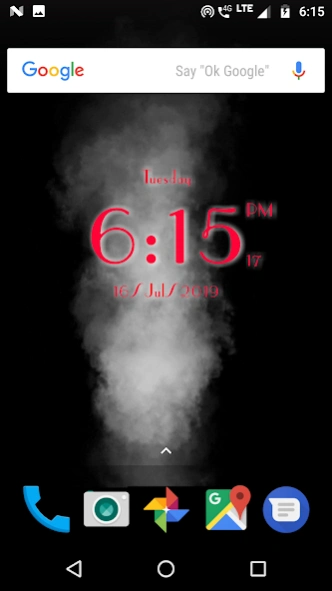


Digital clock live wallpaper with live smoke in background
Smoke Effect Digital clock live wallpaperapplication provide famous unique styles digital clock using.
Create and set wonderful Smoke background art behind the digital clock.
Smoke Live Wallpaper with digital clock with real time wallpaper. You can customise setting for digital clock.
Its a time to change your wallpaper with our new Smoke digital clock live wallpaper app which have led digital clock with displaying of date, month and day of the week. You can show always on display.
Automatically Change date, month and day of the week as per current time. Everyday display a new nature background behind the clock automatically. This is the real time live wallpaper
Auto change clock wallpaper swiftly and automatically changes your mobile wallpaper every day with analog led clock.
For Clock lover, this wonderful app gives an enticing look to your phone. Additionally, you can enable/disable clock custom setting like date, month and day of the week, hourly bell, second hand animation and more..
Our new analog clock live wallpaper shows world time, date and day of the week on your lock or home screen! Don’t miss out on the opportunity to have these “live smoke wallpapers” with an digital clock on home screen!
Choose digital clock as your Live Wallpaper to give a rich & patriotic look to your mobile.
Features:
- Live smoke flow
- Set digital clock Style
- ON/OFF : Show/Hide seconds
- Option to change color of the clock
- Option to set 12-24 hour format
- Show/Hide : glow , seconds, date, day of week.
- Size: Adjust the size of the digital clock.
- Position: Up/Down and Left/Right position of the digital clock.
- Easy to set as wallpaper
- No internet is required. Its works offline.
Set Wallpaper Guide :
Home -> Press the Menu -> Choose Wallpaper -> Select Live Wallpapers ->Select Smoke clock Live wallpaper from the list from the list.
If you like our app then don’t forget to rate it, review it and share with your love ones.
Disclaimer: All logos/images/names are copyright of their perspective owners. Any request to remove one of the images/logos/names will be honored. If You have any issue regarding this please contact us.
About Smoke digital clock live wallp
Smoke digital clock live wallp is a free app for Android published in the Themes & Wallpaper list of apps, part of Desktop.
The company that develops Smoke digital clock live wallp is Wallever. The latest version released by its developer is 1.1.
To install Smoke digital clock live wallp on your Android device, just click the green Continue To App button above to start the installation process. The app is listed on our website since 2021-11-17 and was downloaded 0 times. We have already checked if the download link is safe, however for your own protection we recommend that you scan the downloaded app with your antivirus. Your antivirus may detect the Smoke digital clock live wallp as malware as malware if the download link to com.digital.new.smoke.clock is broken.
The company that develops Smoke digital clock live wallp is Wallever. The latest version released by its developer is 1.1.
To install Smoke digital clock live wallp on your Android device, just click the green Continue To App button above to start the installation process. The app is listed on our website since 2021-11-17 and was downloaded 0 times. We have already checked if the download link is safe, however for your own protection we recommend that you scan the downloaded app with your antivirus. Your antivirus may detect the Smoke digital clock live wallp as malware as malware if the download link to com.digital.new.smoke.clock is broken.
How to install Smoke digital clock live wallp on your Android device:
- Click on the Continue To App button on our website. This will redirect you to Google Play.
- Once the Smoke digital clock live wallp is shown in the Google Play listing of your Android device, you can start its download and installation. Tap on the Install button located below the search bar and to the right of the app icon.
- A pop-up window with the permissions required by Smoke digital clock live wallp will be shown. Click on Accept to continue the process.
- Smoke digital clock live wallp will be downloaded onto your device, displaying a progress. Once the download completes, the installation will start and you'll get a notification after the installation is finished.
Program Details
System requirements
Operating systems
Android
Download information
File size
N/A
Total downloads
0
Pricing
License model
Free
Price
Version History
Here you can find the changelog of Smoke digital clock live wallp since it was posted on our website on 2024-06-29. The latest version is 1.1 and it was updated on Soft112 on 08 October, 2026. See below the changes in each version:
